

1. App.vue
<script setup lang="ts">
</script>

<template>
  <h1>Hello Vue 3</h1>
</template>

<style scoped>
</style>
- script setup -> Vue3 권장 문법
- template -> 화면
- style scoped -> 이 컴포넌트에만 스타일 적용
2. 반응형 데이터 (ref)
<script setup lang="ts">
import { ref } from "vue";

const count = ref(0);
</script>

<template>
  <h1>Count: {{ count }}</h1>
</template>
- ref(값) -> 반응형
- template에서는 .value 안씀
3. 이벤트 바인딩 (click)
<script setup lang="ts">
import { ref } from "vue";

const count = ref(0);

function increment(){
  count.value++;
}

</script>

<template>
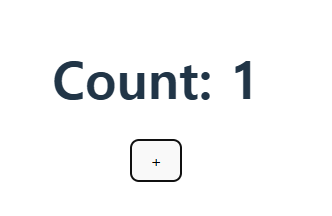
  <h1>Count: {{ count }}</h1>
  <button @click="increment" >+</button>
</template>
- @click = v-on:click
- script에서는 .value로 값을 뽑음
- 버튼 클릭시 count를 1씩 증가
4. v-model (양방향 바인딩)
<script setup lang="ts">
import { ref } from "vue";

const name = ref("");
</script>

<template>
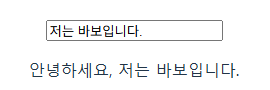
  <input v-model="name" placeholder="이름 입력" />
  <p>안녕하세요, {{ name }}</p>
</template>
- v-model = input <-> state 자동 연결
- form에서 필수 문법
5. 조건 렌더링 (v-if)
<script setup lang="ts">
import { ref } from "vue";

const isLogin = ref(false);
</script>

<template>
  <button @click="isLogin = !isLogin">
    로그인 토글
  </button>

  <p v-if="isLogin">로그인 상태</p>
  <p v-else>로그아웃 상태</p>
</template>
- 기본값 false이므로 처음 화면은 로그아웃 상태, 버튼 클릭시 로그인 상태로 변경됨
- 조간이 자주 바뀌면 v-show 고려,
6. reactive vs ref
- ref : 원시값 (number, string, boolean)
- reactive : 객체, 폼데이터
<script setup lang="ts">
import { reactive, ref } from "vue";

const count = ref(0);

const user = reactive({
  name: "",
  age: 0,
})
</script>

<template>
  <p>count: {{ count }}</p>

  <input v-model="user.name" placeholder="이름" />
  <input v-model="user.age" type="number" placeholder="이름" />

  <p>{{ user.name }} // {{ user.age }}</p>
</template>
- reactive는 .value 못씀
- 객체는 왠만하면 reactive
7. computed
<script setup lang="ts">
import { computed, ref } from "vue";

const count = ref(0);

const doubleCount = computed(() => {
  return count.value * 2;
})

</script>

<template>
  <button @click="count++"></button>
  <p>count: {{ count }}</p>
  <p>double: {{ doubleCount }}</p>
</template>
- 값 가공은 computed
- computed는 캐싱효과가 있음
7-1. computed 캐싱
<script setup lang="ts">
import { computed, ref } from "vue";

const count = ref(0);

const doubleCount = computed(() => {
  console.log("computed")
  return count.value * 2;
})

const test = () => {
  console.log("method");
  return count.value * 2;
}

</script>

<template>
  <button @click="count++"></button>
  <p>count: {{ count }}</p>
  <p>double: {{ doubleCount }}</p>
  <p>double: {{ doubleCount }}</p>
  <p>double: {{ test() }}</p>
  <p>double: {{ test() }}</p>
</template>
- 위에 코드를 실행후 network console로 확인을하면 computed로 선언한 함수는 2번 호출했는데 1번이 console로 찍히고,
함수를 2번 호출시는 2번 console이 찍힘

8. Watch
<script setup lang="ts">
import { ref, watch } from "vue";

const count = ref(0);

watch(count, (newVal, oldVal) => {
  console.log("변경 : ", oldVal, "->", newVal);
})

</script>

<template>
  <button @click="count++"></button>
  <p>{{ count }}</p>
</template>
- count 값이 변경될때 watch가 동작
9. v-for
<script setup lang="ts">
import { ref } from "vue";

const todos = ref([
  { id: 1, text: "Vue 공부" },
  { id: 2, text: "TypeScript 공부" },
]);
</script>

<template>
  <ul>
    <li v-for="todo in todos" :key="todo.id">
      {{ todo.text }}
    </li>
  </ul>
</template>
- key 필수, id 없으면 에러
9-1. computed + v-for
<script setup lang="ts">
import { ref, computed } from "vue";

const todos = ref([
  { id: 1, text: "Vue", done: true },
  { id: 2, text: "TS", done: false },
]);

const doneTodos = computed(() =>
  todos.value.filter(t => t.done)
);
</script>

<template>
  <h3>완료</h3>
  <ul>
    <li v-for="t in doneTodos" :key="t.id">
      {{ t.text }}
    </li>
  </ul>
</template>
- todo 리스트에서 done이 true인 항목만 필터링해서 화면에 뿌림
10. props & emit
Parent.vue
<script setup>
import { ref } from 'vue'
import Child from './Child.vue' // 자식 컴포넌트 불러오기
const myTitle = ref("부모가 주는 선물")
const myCount = ref(0)
// 자식이 보낸 신호를 받았을 때 실행할 함수
const handleIncrease = () => {
myCount.value++
console.log("자식의 신호를 받았습니다!")
}
</script>
<template>
<div style="border: 2px solid #35495e; padding: 20px;">
<h1>👨👩👧 여기는 부모 컴포넌트</h1>
<p>현재 부모의 숫자: {{ myCount }}</p>
<Child
:childTitle="myTitle"
:count="myCount"
@increase-count="handleIncrease"
/>
</div>
</template>
Child.vue
<script setup>
// 1. Props 정의: 부모에게 받을 데이터 이름표를 만듭니다.
const props = defineProps({
  childTitle: String, // 타입 지정 (String, Number 등)
  count: Number
})

// 2. Emits 정의: 부모에게 보낼 신호 이름을 정합니다.
const emit = defineEmits(['increase-count'])

// 버튼 클릭 시 실행할 함수
const sendSignal = () => {
  // 'increase-count'라는 신호를 부모에게 발사! (필요하면 두 번째 인자로 데이터 전달 가능)
  emit('increase-count')
}
</script>

<template>
  <div style="border: 2px solid #42b883; padding: 10px; margin: 10px;">
    <h3>👶 여기는 자식 컴포넌트</h3>
    <p>받은 제목: {{ childTitle }}</p>
    <p>받은 숫자: {{ count }}</p>

    <button @click="sendSignal">숫자 올려달라고 조르기 (Emit)</button>
  </div>
</template>'frontend > Vue' 카테고리의 다른 글
| Vue 예제 - BootStrap Vue 적용 (0) | 2022.12.27 |
|---|---|
| VsCode 것허브 연동 커밋 (0) | 2022.12.27 |
| 3. Vue 예제 - 서버 실행, vue-router 적용, footer, header 나누기 (0) | 2022.12.27 |
| 2. Vue 예제 - VsCode 플러그인 사용해보기 (0) | 2022.12.27 |
| 1. vue 예제 - Vue 프로젝트 생성 (0) | 2022.12.27 |